
Converters
This page documents the automated process for converting keyboards to use drop-in replacement controllers. This process is designed to be easy to use and can be completed in a few simple steps.
You can generate the firmware by appending -e CONVERT_TO=<target> to your compile/flash command. For example:
qmk flash -c -kb keebio/bdn9/rev1 -km default -e CONVERT_TO=proton_cYou can also configure this within your keymap to accomplish the same thing.
TIP
If you get build errors, you will need to convert the keyboard's code to be compatible with the converter feature, or provide additional keymap configuration.
Supported Converters
Each converter category is broken down by its declared pin compatibility. This ensures that only valid combinations are attempted.
The following converters are available at this time:
| From | To |
|---|---|
promicro | proton_c |
promicro | kb2040 |
promicro | sparkfun_pm2040 |
promicro | blok |
promicro | bit_c_pro |
promicro | stemcell |
promicro | bonsai_c4 |
promicro | rp2040_ce |
promicro | elite_pi |
promicro | helios |
promicro | liatris |
promicro | imera |
promicro | michi |
promicro | svlinky |
elite_c | stemcell |
elite_c | rp2040_ce |
elite_c | elite_pi |
elite_c | helios |
elite_c | liatris |
Configuration
Configuring a converter to use can be done by adding one of the following lines to your keymaps's configuration:
{
    "version": 1,
    "keyboard": "keebio/bdn9/rev1",
    "keymap": "keebio_bdn9_rev1_layout_2025-05-20",
    "converter": "proton_c",
    "layout": "LAYOUT",
}
TIP
If you get build errors, you will need to convert the keyboard's code to be compatible with the converter feature, or provide additional keymap configuration.
Pro Micro Converters
If a board currently supported by QMK uses a Pro Micro (or compatible board), the supported alternative controllers are:
| Device | Target | CLI Argument | rules.mk | Condition |
|---|---|---|---|---|
| Proton C | proton_c | -e CONVERT_TO=proton_c | CONVERT_TO=proton_c | #ifdef CONVERT_TO_PROTON_C |
| Adafruit KB2040 | kb2040 | -e CONVERT_TO=kb2040 | CONVERT_TO=kb2040 | #ifdef CONVERT_TO_KB2040 |
| SparkFun Pro Micro - RP2040 | sparkfun_pm2040 | -e CONVERT_TO=sparkfun_pm2040 | CONVERT_TO=sparkfun_pm2040 | #ifdef CONVERT_TO_SPARKFUN_PM2040 |
| Blok | blok | -e CONVERT_TO=blok | CONVERT_TO=blok | #ifdef CONVERT_TO_BLOK |
| Bit-C PRO | bit_c_pro | -e CONVERT_TO=bit_c_pro | CONVERT_TO=bit_c_pro | #ifdef CONVERT_TO_BIT_C_PRO |
| STeMCell | stemcell | -e CONVERT_TO=stemcell | CONVERT_TO=stemcell | #ifdef CONVERT_TO_STEMCELL |
| customMK Bonsai C4 | bonsai_c4 | -e CONVERT_TO=bonsai_c4 | CONVERT_TO=bonsai_c4 | #ifdef CONVERT_TO_BONSAI_C4 |
| RP2040 Community Edition | rp2040_ce | -e CONVERT_TO=rp2040_ce | CONVERT_TO=rp2040_ce | #ifdef CONVERT_TO_RP2040_CE |
| Elite-Pi | elite_pi | -e CONVERT_TO=elite_pi | CONVERT_TO=elite_pi | #ifdef CONVERT_TO_ELITE_PI |
| 0xCB Helios | helios | -e CONVERT_TO=helios | CONVERT_TO=helios | #ifdef CONVERT_TO_HELIOS |
| Liatris | liatris | -e CONVERT_TO=liatris | CONVERT_TO=liatris | #ifdef CONVERT_TO_LIATRIS |
| Imera | imera | -e CONVERT_TO=imera | CONVERT_TO=imera | #ifdef CONVERT_TO_IMERA |
| Michi | michi | -e CONVERT_TO=michi | CONVERT_TO=michi | #ifdef CONVERT_TO_MICHI |
| Svlinky | svlinky | -e CONVERT_TO=svlinky | CONVERT_TO=svlinky | #ifdef CONVERT_TO_SVLINKY |
Proton C
The Proton C only has one on-board LED (C13), and by default, the TXLED (D5) is mapped to it. If you want the RXLED (B0) mapped to it instead, add this line to your config.h:
#define CONVERT_TO_PROTON_C_RXLEDThe following defaults are based on what has been implemented for STM32 boards.
| Feature | Notes |
|---|---|
| Audio | Enabled |
| RGB Lighting | Disabled |
| Backlight | Forces task driven PWM until ARM can provide automatic configuration |
| USB Host (e.g. USB-USB converter) | Not supported (USB host code is AVR specific and is not currently supported on ARM) |
| Split keyboards | Partial - heavily dependent on enabled features |
Adafruit KB2040
The following defaults are based on what has been implemented for RP2040 boards.
| Feature | Notes |
|---|---|
| RGB Lighting | Enabled via PIO vendor driver |
| Backlight | Forces task driven PWM until ARM can provide automatic configuration |
| USB Host (e.g. USB-USB converter) | Not supported (USB host code is AVR specific and is not currently supported on ARM) |
| Split keyboards | Partial via PIO vendor driver - heavily dependent on enabled features |
SparkFun Pro Micro - RP2040, Blok, Bit-C PRO and Michi
Feature set is identical to Adafruit KB2040.
STeMCell
Feature set currently identical to Proton C. There are two versions of STeMCell available, with different pinouts:
- v1.0.0
- v2.0.0 (pre-release v1.0.1, v1.0.2) Default official firmware only supports v2.0.0 STeMCell.
STeMCell has support to swap UART and I2C pins to enable single-wire uart communication in STM chips. The following additional flags has to be used while compiling, based on the pin used for split communication:
| Split Pin | Compile flags |
|---|---|
| D3 | -e STMC_US=yes |
| D2 | Not needed |
| D1 | -e STMC_IS=yes |
| D0 | Not needed |
Bonsai C4
The Bonsai C4 only has one on-board LED (B2), and by default, both the Pro Micro TXLED (D5) and RXLED (B0) are mapped to it. If you want only one of them mapped, you can undefine one and redefine it to another pin by adding these line to your config.h:
#undef B0
// If VBUS detection is unused, we can send RXLED to the Vbus detect pin instead
#define B0 PAL_LINE(GPIOA, 9)
RP2040 Community Edition - Elite-Pi, Helios, and Liatris
Feature set is identical to Adafruit KB2040. VBUS detection is enabled by default for superior split keyboard support. For more information, refer to the Community Edition pinout docs.
Svlinky
Feature set is a pro micro equivalent of the RP2040 Community Edition, except that two of the analog GPIO have been replaced with digital only GPIO. These two were moved to the FPC connector to support the VIK specification. This means that if you are expecting analog support on all 4 pins as provided on a RP2040 Community Edition pinout, you will not have that. Please see the Svlinky github page for more details.
Elite-C Converters
If a board currently supported by QMK uses an Elite-C, the supported alternative controllers are:
| Device | Target | CLI Argument | rules.mk | Condition |
|---|---|---|---|---|
| STeMCell | stemcell | -e CONVERT_TO=stemcell | CONVERT_TO=stemcell | #ifdef CONVERT_TO_STEMCELL |
| RP2040 Community Edition | rp2040_ce | -e CONVERT_TO=rp2040_ce | CONVERT_TO=rp2040_ce | #ifdef CONVERT_TO_RP2040_CE |
| Elite-Pi | elite_pi | -e CONVERT_TO=elite_pi | CONVERT_TO=elite_pi | #ifdef CONVERT_TO_ELITE_PI |
| 0xCB Helios | helios | -e CONVERT_TO=helios | CONVERT_TO=helios | #ifdef CONVERT_TO_HELIOS |
| Liatris | liatris | -e CONVERT_TO=liatris | CONVERT_TO=liatris | #ifdef CONVERT_TO_LIATRIS |
STeMCell
Identical to Pro Micro - STeMCell with support for the additional bottom row of pins.
RP2040 Community Edition
Identical to Pro Micro - RP2040 Community Edition with support for the additional bottom row of pins.
Advanced Topics
Keyboard Configuration
To configure a keyboard to allow the converter feature, add the following line to your keyboard's .json configuration:
{
    "maintainer": "QMK",
    "development_board": "promicro",
    "diode_direction": "COL2ROW",
}
See the pin compatibility for more information.
Additional Requirements
Keyboards must use the platform agnostic abstractions provided by QMK. This includes:
- Use of GPIO Controls.
Additional Keymap Configuration
While effort has been made to make converters as compatible as possible, sometimes additional platform specific configuration is required.
For example, enabling hardware peripherals by adding a keymap level mcuconf.h with something like the following:
#pragma once

#include_next <mcuconf.h>

#undef RP_SIO_USE_UART0
#define RP_SIO_USE_UART0 TRUE
You can find details on how to configure drivers on their respective pages.
Alternatively, you may have to disable incompatible features. For example:
{
    "version": 1,
    "keyboard": "keebio/bdn9/rev1",
    "keymap": "keebio_bdn9_rev1_layout_2025-05-20",
    "converter": "proton_c",
    "config": {
        "features": {
            "audio": false
        }
    }
    "layout": "LAYOUT",
}
Conditional Configuration
Once a converter is enabled, it exposes the CONVERT_TO_<target_uppercase> flag that you can use in your code with #ifdefs, For example:
#ifdef CONVERT_TO_PROTON_C
    // Proton C code
#else
    // Pro Micro code
#endif
Pin Compatibility
To ensure compatibility, provide validation, and power future workflows, a keyboard should declare its pin compatibility. This ensures that only valid combinations are attempted.
Note
This will already be configured for you if are using the promicro development board preset.
To declare the base interface for conversions, add the following line to your keyboard's configuration:
{
    "maintainer": "QMK",
    "development_board": "elite_c",
    "pin_compatible": "elite_c",
    "diode_direction": "COL2ROW",
}
The above example, configures a keyboard for a default of elite_c while allowing any of the elite_c converter targets.
The framework then allows mapping of pins from <PIN_COMPATIBLE> to converter <target>.
WARNING
Mapped pins should adhere strictly to the defined interface, any extras present on the hardware should be ignored.
Available Pin Compatibility
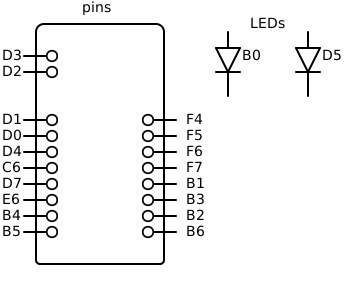
Notes:
Includes LEDs - these may be mapped to unused/unavailable pins when not present.